GatiNavWarehouse management
Safety-first warehouse management · Ontario first

Nothing moves
until it’s cleared.

GatiNav is a warehouse management system with your safety rules inside every scan. The operator’s certificate, the truck’s pre-shift check, the bay’s damage, the contractor’s papers and the client who owns the stock are checked by the database before anything moves, from any phone, screen or integration.

  • Unlimited users per site
  • Any phone is the scanner
  • Your own copy, hosted in Canada
  • 394 automated checks on every release
The idea

Every move gets an answer.

Gati is Sanskrit for motion; Nav is to steer. Every warehouse has safety rules on paper, and paper doesn't stop a forklift. GatiNav checks each move before it happens and answers in one of three colours.

Cleared

Certified operator, inspected truck, sound bay, right client. The scan goes through.

Heads up

A certificate expires in 9 days, an inspection is due, a trailer has waited too long. It goes through, and someone is told.

Stopped

A failed pre-shift check, a Grade A damaged bay, a contractor without insurance. Nothing moves, and the screen says why and who can clear it.

Warehouse reality

Paper doesn't stop a forklift.

Six things that slip through when the rules live in a binder. In GatiNav, each one is a rule the database checks.

Unchecked forklifts

A failed pre-use check must keep the truck parked.

Expired certificates

Forklift, WHMIS, first aid. Caught before the shift.

Uncleared contractors

No valid WSIB clearance or insurance, no gate entry.

Damaged racking

Serious damage locks the bay until it's fixed.

Monitoring policy

Ontario's ESA rules for 25+ staff. Acknowledgments tracked.

Mixed-up clients

Each client sees only its own stock and charges.

General information, not legal advice.

Product tour

Gatehouse to invoice, in one system.

Real screens from the demo, with made-up data. Pick a part of the warehouse.

Floor

Built for gloves and glare.

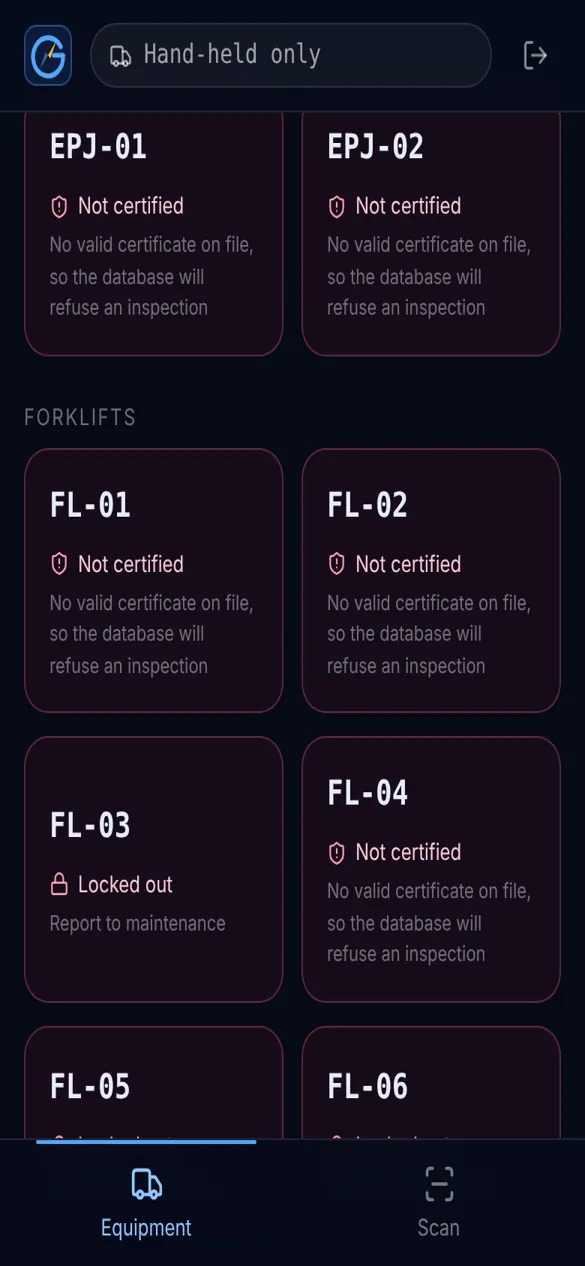
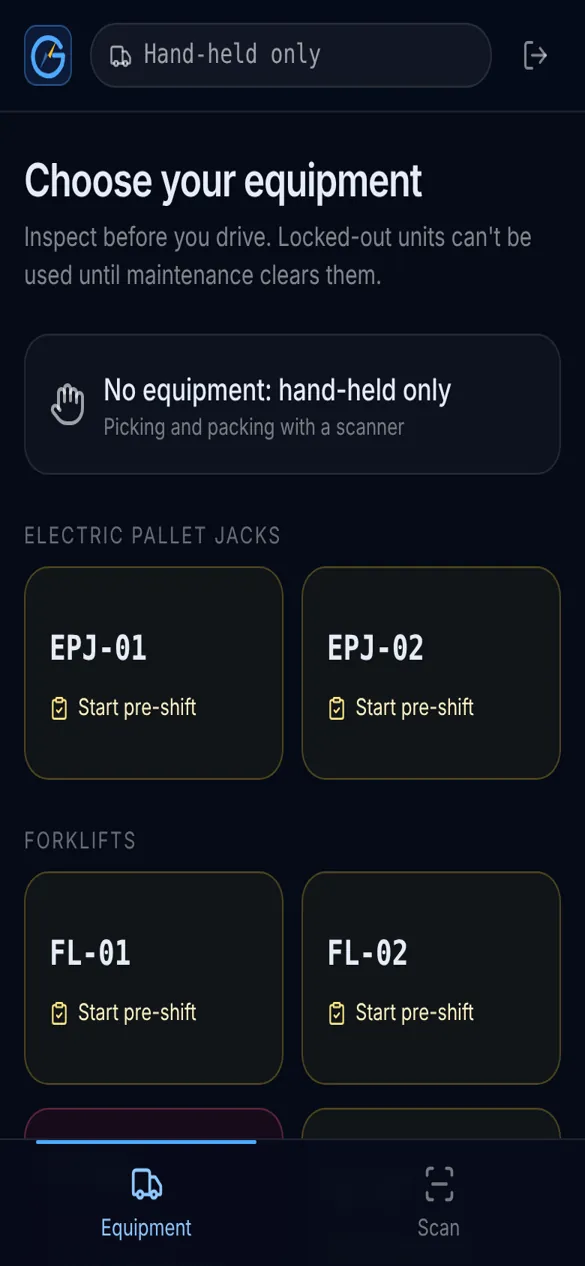
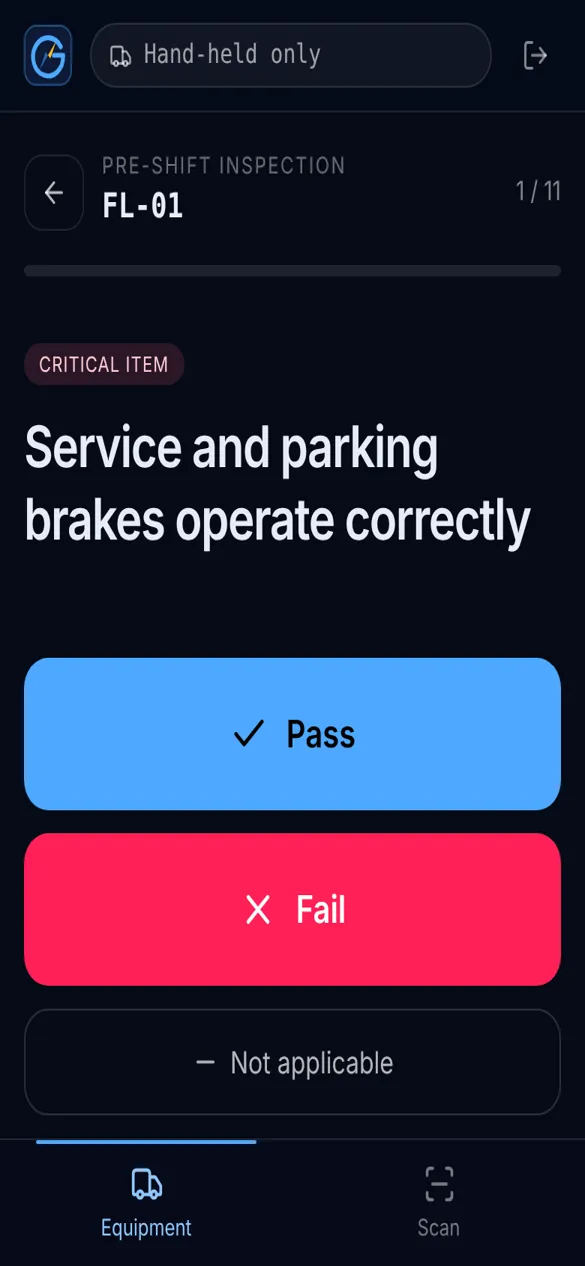
Operators use their own phone or a shared tablet: big buttons, one task per screen, and an answer after every scan. Scans wait on the phone when the Wi-Fi drops.

  • One-tap pre-shift inspections
  • Receive, put away, move and pick
  • “Not certified” shown before the shift starts
  • Phone camera or a hardware scanner
Equipment list on a phone
Pre-shift inspection with Pass and Fail buttons
Equipment marked Not certified
Racking

Damage locks the bay.

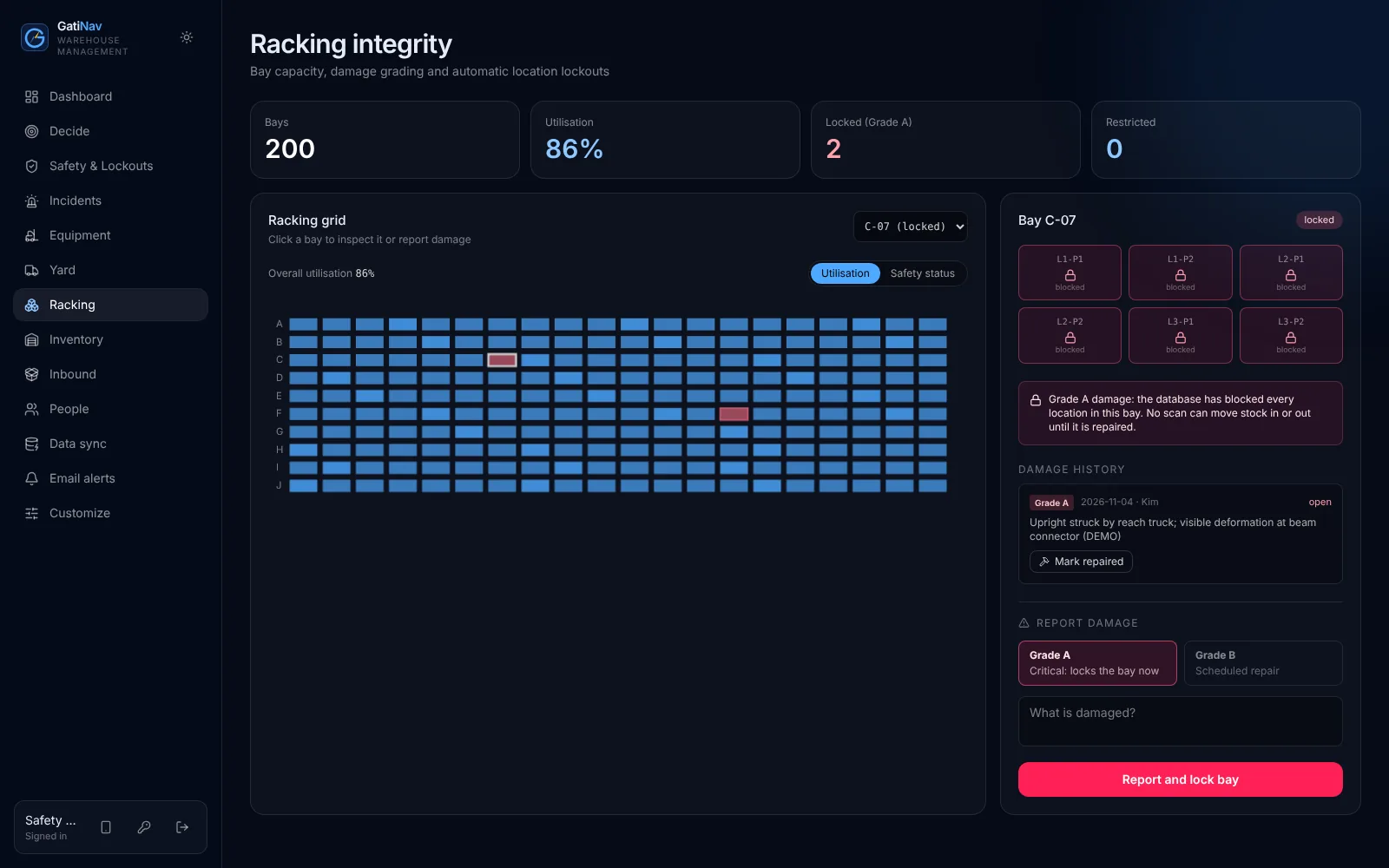
Inspectors grade racking damage as they find it. Serious damage blocks every location in the bay until it is repaired, and no scan can put stock there.

  • Grade A blocks the whole bay at once
  • Grade B gets a repair date
  • Full damage history per bay
gatinav / racking
Racking bay locked after Grade A damage
Yard and gate

Papers checked at the gate.

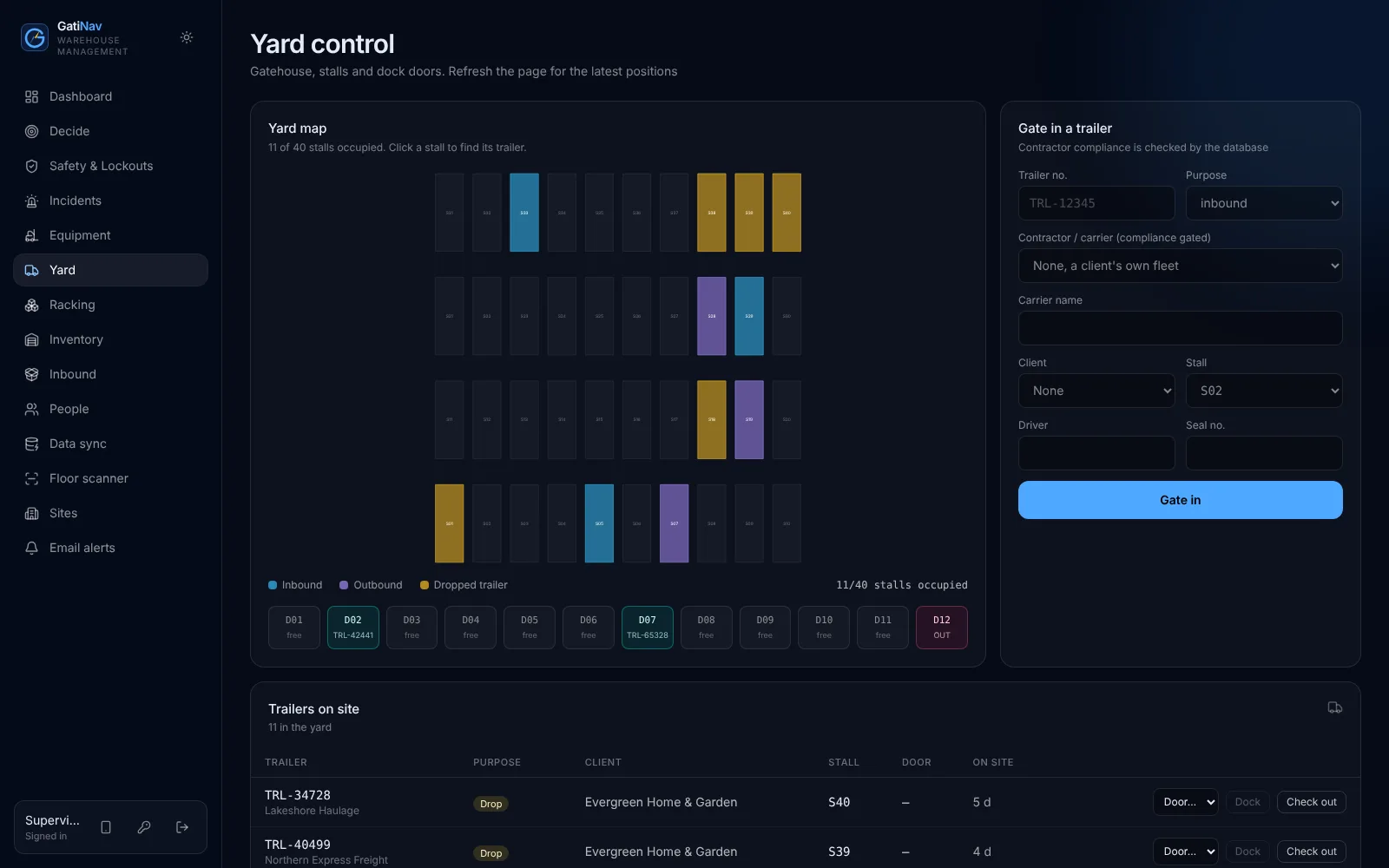
Trailers and contractors are checked in at the gate against the documents your site requires. Stalls and dock doors can’t be double-booked.

  • Expired WSIB clearance? Entry refused.
  • Stalls and doors on one map
  • Gate in, dock, check out, with times
gatinav / yard
Yard map and gate-in form
Inbound

Know what’s coming. See what arrived.

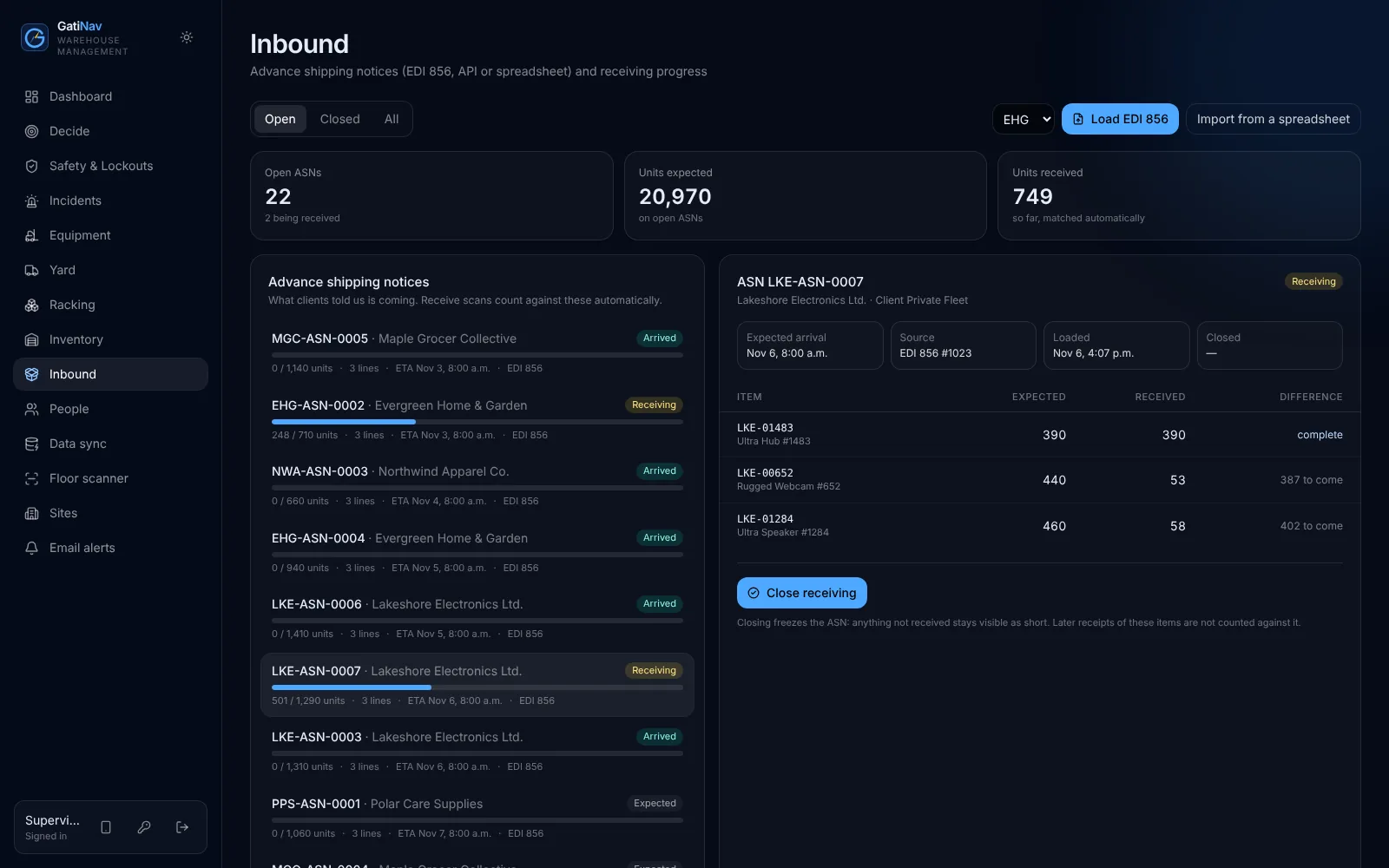
Ship notices arrive by EDI 856, API or spreadsheet. Receive scans count against them, so over and short show up while the truck is still at the door.

  • EDI 856, API or spreadsheet
  • Receive scans matched automatically
  • Over and short per item
gatinav / inbound
ASN list with expected and received quantities
Client portal

Their stock. Their charges. Nobody else’s.

For warehouses that store goods for others: each client signs in to its own stock, ship notices and invoices, walled off by the database.

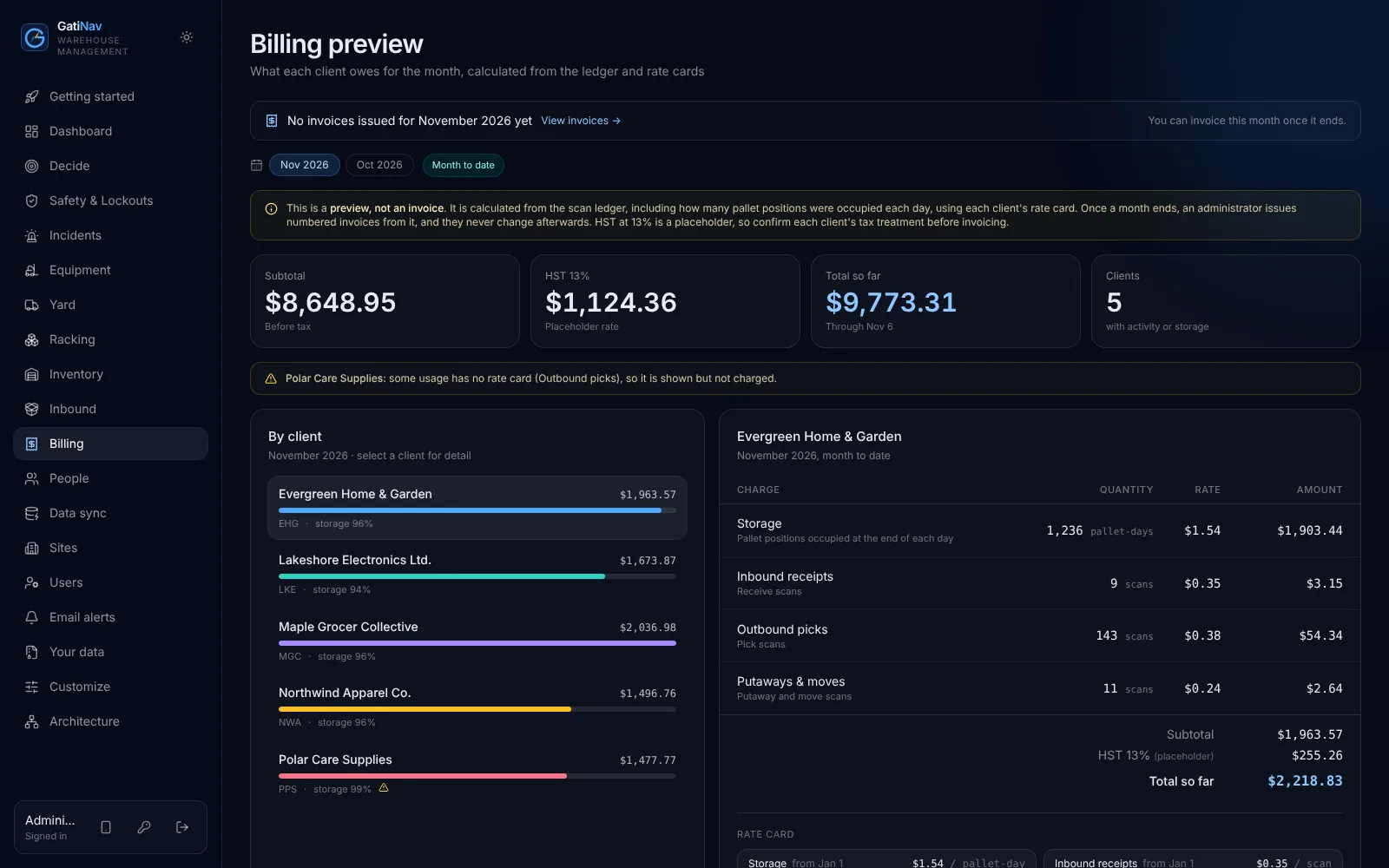
  • Billing preview from each rate card
  • Storage from the ledger, every day counted
  • Their ASNs: what’s coming, what arrived
gatinav / billing
Billing preview by client
Invoices

Month closed. Invoice issued.

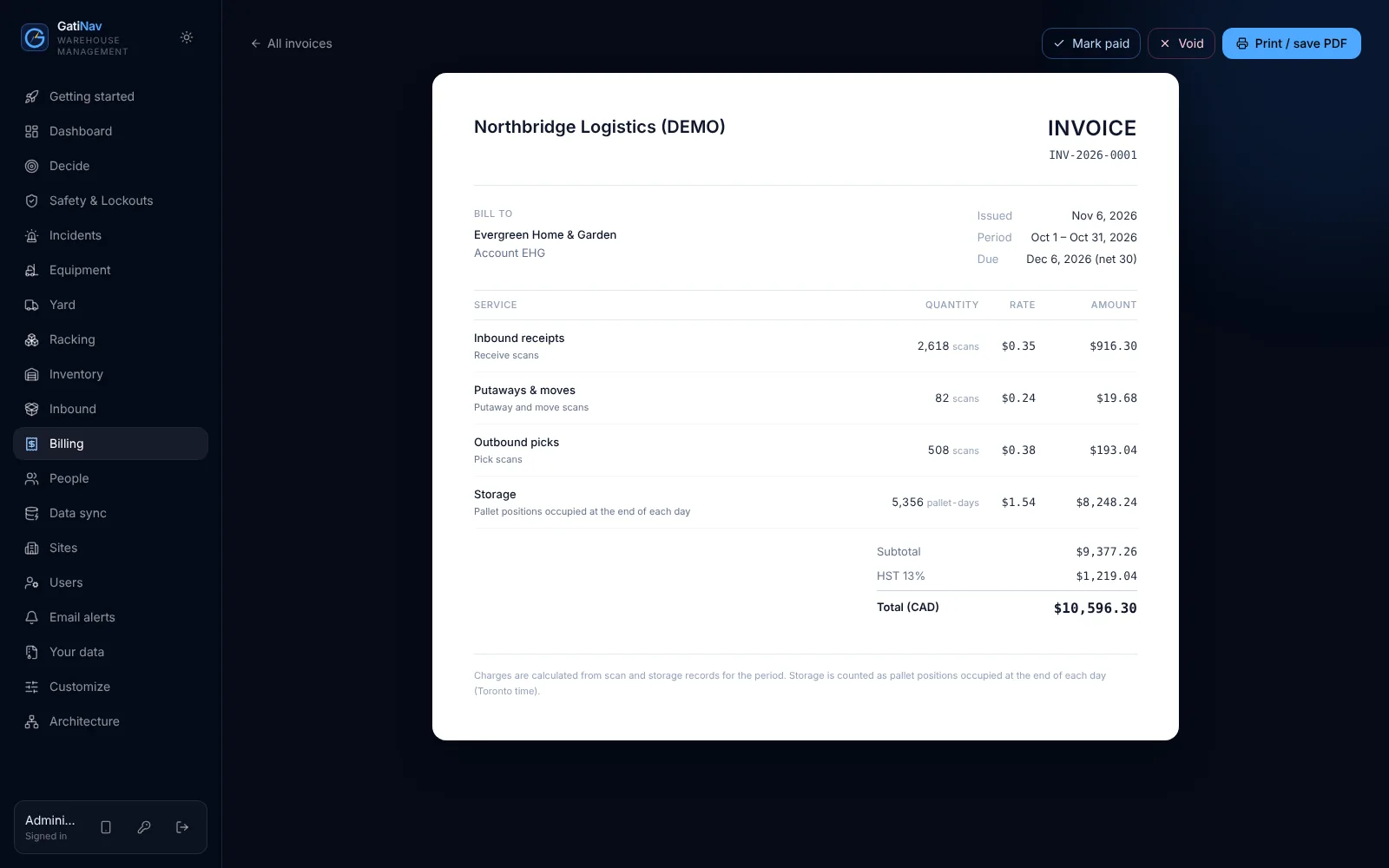
At month end, invoices come from what was actually scanned and stored, at each client’s rates. Numbered without gaps and frozen once issued.

  • Built from the ledger and rate cards
  • Numbered with no gaps
  • Frozen once issued; void with a reason
gatinav / invoice
A printable invoice
Data in

Your spreadsheets, matched on screen.

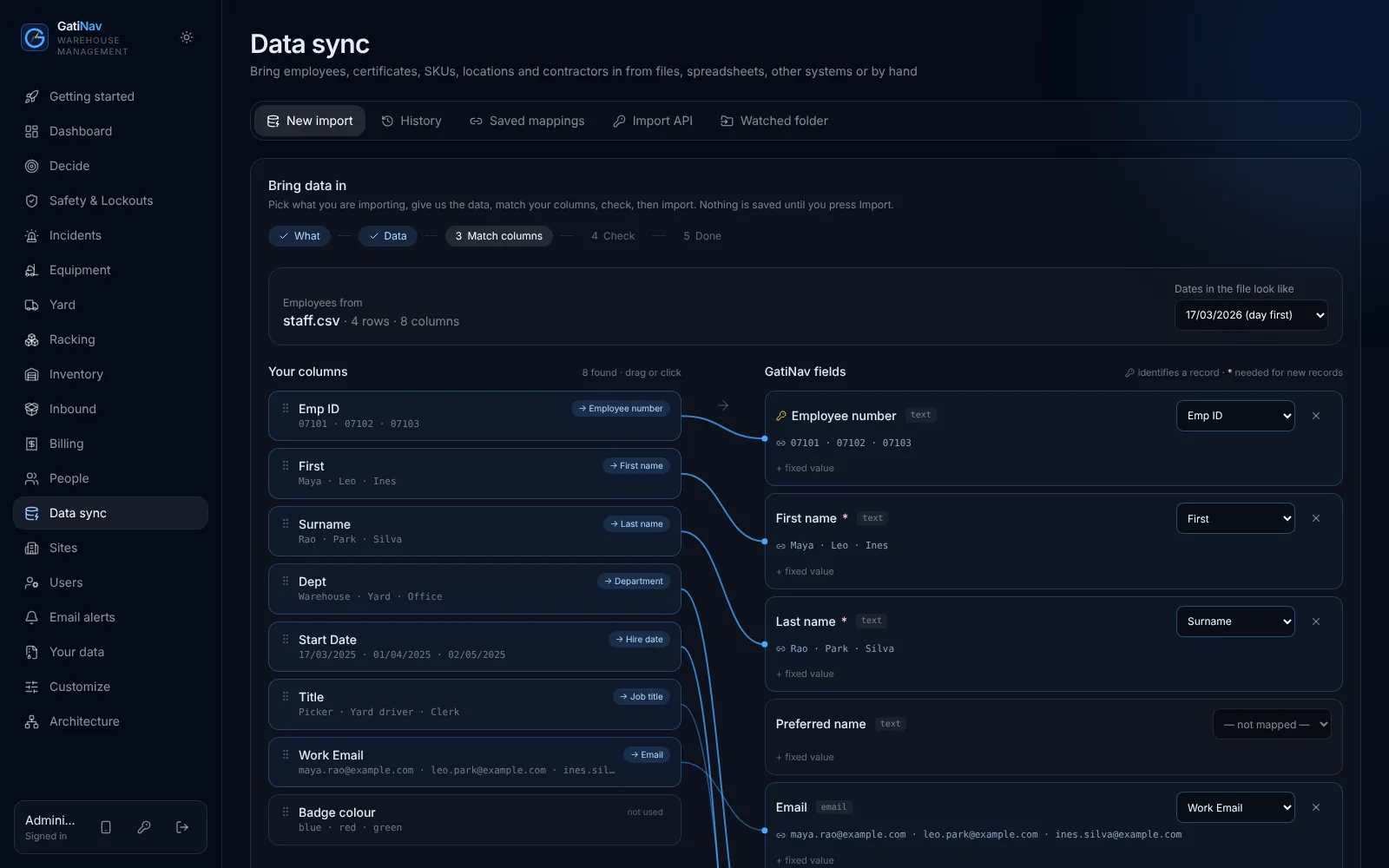
Bring people, certificates, equipment and stock from the files you already have. Every row is checked before anything is saved.

  • Excel, CSV, paste or type
  • Drag your columns onto ours
  • Import API and watched folder for other systems
gatinav / data sync
Column mapper matching a spreadsheet to GatiNav fields
Decide · in the Command plan

Your morning starts with the money.

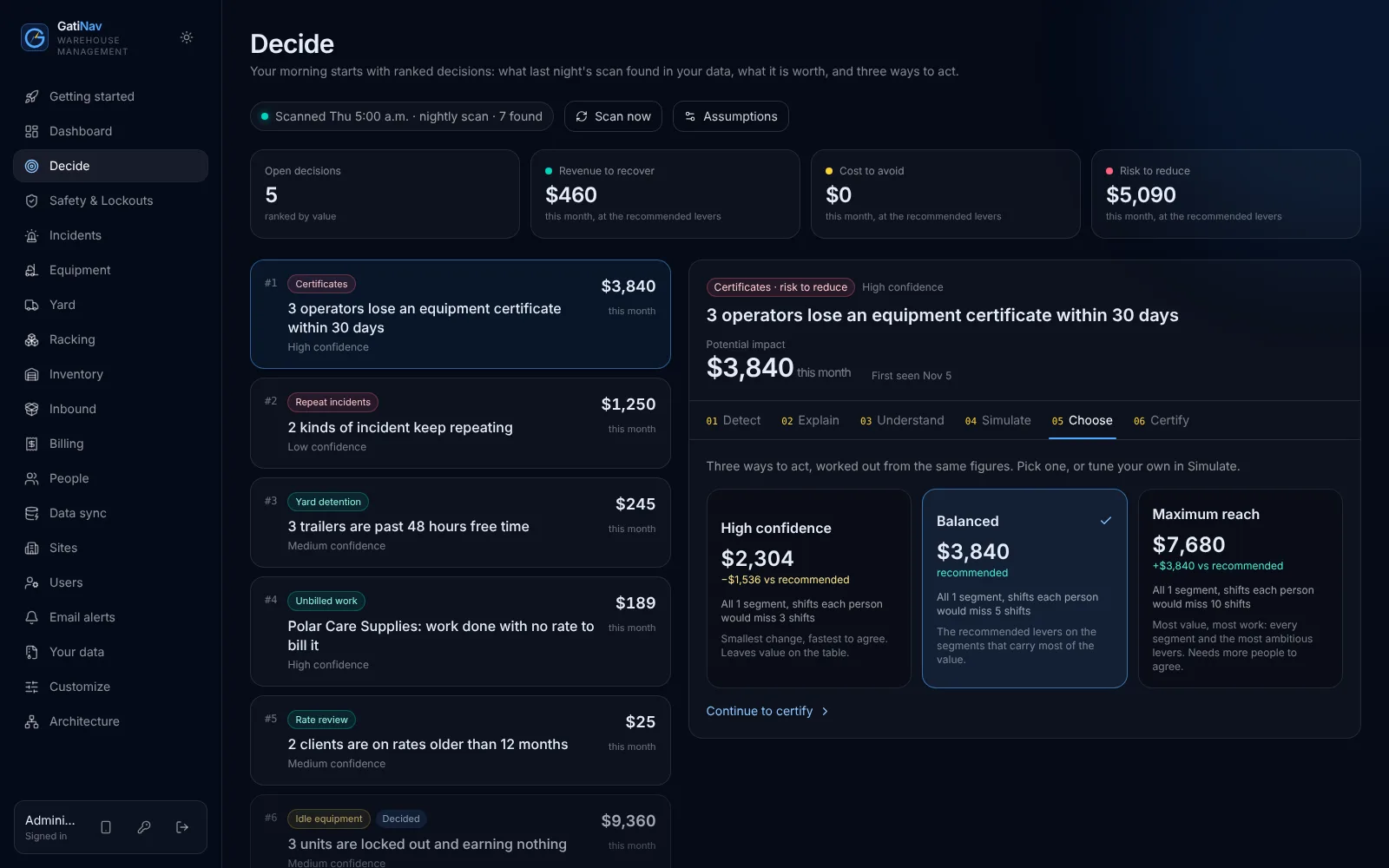
Each night GatiNav reads your own records and ranks what is worth acting on, in dollars: work with no rate to bill it, storage blocked by damage, trucks standing idle, certificates about to take people off equipment, trailers past free time.

1Detect2Explain3Understand4Simulate5Choose6Certify

Not AI: figures come from your data and the assumptions you set, and the words from fixed rules. The same data always gives the same answer.

Decide · Tuesday 06:00Illustrative figures
Four decisions, ranked by value
  1. 01
    Bill pallet moves that have no rateNorthbridge Apparel · 214 moves last month
    $3,420per month
  2. 02
    Renew three forklift certificatesExpire in 9 days · 3 operators off equipment
    $2,880at risk
  3. 03
    Repair bay B-07Grade A damage · 18 positions blocked
    $1,960per month
  4. 04
    Move idle FL-05 to the second shiftIdle most of the first shift
    $1,150per month
gatinav / decide
GatiNav Decide: ranked decisions with dollar impact, and three ways to act on the selected one
See it work

A day in the warehouse.

From the morning's ranked decisions to month-end invoices, recorded in the real product. Captions on screen, so it works with the sound off.

The story

One shift. Everyone in it.

An animated story: the gate, signing in, picking a truck, the pre-shift check, the floor, and what each person puts in and gets back.

What you get

Three plans. Same rules in every one.

Per site, per month, unlimited users. Start with the plan that fits what your site runs today; your people, equipment and history carry over when you move up.

Safety

Safety

For sites that already have a WMS and need the floor rules enforced.

  • Pre-shift checks that lock failed trucks
  • Certificates with expiry; uncertified operators can’t drive
  • Contractor papers checked at the gate
  • Incidents, investigations and corrective actions
  • Phone scanner that works through weak Wi-Fi
Ask about Safety
Operations · the full WMS

Operations

For warehouses and distribution centres that need a WMS with the rules built in.

  • Everything in Safety
  • Receiving, put-away, picking and moves on a stock ledger
  • ASNs by EDI 856, API or spreadsheet
  • Racking damage that blocks the bay
  • Yard, gate, stalls and dock doors
  • Client portal, storage billing and invoices
Ask about Operations
Command

Command

For operations managers who want each morning’s decisions sized in dollars.

  • Everything in Operations
  • Decide: ranked decisions every morning
  • Simulate, choose and certify, with follow-up actions
  • Priority support
  • A quarterly review of your sites with us
Ask about Command
Unlimited usersOnboarding: we import your people, equipment and stockUpdates includedYour own copy, hosted in CanadaExport everything, any time

Compare the plans in full → · Prices on request, per site, in Canadian dollars.

Day one

From spreadsheets to scanning.

A getting-started checklist walks your administrator through it, and ticks itself off as you go.

  1. Bring your people

    Upload the staff list and certificates. Expiry dates are worked out for you.

  2. Bring the warehouse

    Clients, SKUs, locations, equipment and opening stock, from the files you already have.

  3. Connect clients

    Their ASNs arrive by EDI, API or spreadsheet. Rate cards set the prices.

  4. Scan and bill

    Operators scan with a phone. At month end, invoices come from what was scanned.

Who it's for

One system. Three kinds of people.

Warehouse operators

Your own stock or your clients'. Receiving, storage, picking, yard and billing in one place.

Safety and HR leads

Certificates, inspections, lockouts and racking damage enforced, not just recorded.

Your clients

Their own stock, ASNs and invoices. Never anyone else's.

Security and hosting

Your own copy. In Canada.

Every customer runs on a copy of GatiNav of its own, with its own database, passwords and encrypted backups, on servers in Canada. Inside it, the database walls off every client and keeps a history no one can quietly rewrite.

Your own copy

Your own database, app and backups, never shared with another customer. A private server if you want one.

Hosted in Canada

Servers in Toronto. Your records stay in the country.

Walled off by the database

Row-level security on every table: each client sees only its own stock and charges.

Tamper-evident history

A hash-chained audit trail: any edit to history can be detected.

Stock on a ledger

Movements are added, never changed, so every count can be traced.

Sign in your way

Two-factor sign-in, or Microsoft and Google work accounts with single sign-on.

FAQ

Straight answers.

Does it make us compliant?

No software can on its own. GatiNav enforces the rules you set; starter defaults should be confirmed by your legal and safety advisers.

Can a device get around the rules?

No. The database enforces them for every screen, handheld and integration.

Where does our data live?

In Canada. Each customer gets its own copy of GatiNav, with its own database and its own encrypted backups, on servers in Canada (Toronto). A private server just for you is available too.

Where can we use GatiNav?

Anywhere in North America. The first release builds in Ontario's rules: Reg. 851 pre-shift inspections, WSIB clearance for contractors and HST on invoices. Future releases add the rules of other provinces, territories and US states, starting with where our customers operate.

How does our existing data get in?

Upload Excel or CSV and match your columns on screen, paste from a spreadsheet, type records in, or let your HR or ERP system push them through an import API or a watched folder. Every import is checked first and nothing is saved until you confirm.

Does it send invoices? EDI?

Yes to both. Once a month ends, GatiNav issues numbered invoices from the ledger and rate cards; they never change afterwards and print to PDF. Clients' EDI 856 ship notices load as ASNs, through the API or a watched folder, and receive scans count against them.

Do operators need special scanners?

No. Any phone or tablet camera reads the barcodes. Handheld scanners work too.

Two-factor sign-in?

Yes. A code from any authenticator app after the password, with recovery codes. Each organisation decides who must use it: administrators, or everyone.

Can we sign in with Microsoft or Google?

Yes, with work accounts from Microsoft Entra ID or Google Workspace. Your administrator connects your directory, and it signs in only the people you have added to GatiNav. You can also keep passwords for administrators only.

What if the Wi-Fi drops on the floor?

Keep scanning. Scans wait on the phone and are sent, with the time they were taken, when the connection is back. Each is counted once, and every safety rule is still checked.

Can we take our data with us?

Any time. Administrators download everything as one spreadsheet-ready file per kind of record. If you leave, we delete your data and give you a deletion certificate.

Is Decide an AI?

No. Decide sizes each decision from your own records and the assumptions you set (idle equipment cost, labour cost, detention charge and so on), and writes the briefing with fixed rules. The same data always gives the same figures and words, and every report lists its assumptions.

Pricing?

Per site, per month, with unlimited users, in three plans: Safety, Operations and Command. See the plans, or email for a quote.
See it refuse.

With a demo pass, open every screen as an operator, a safety lead or a client.